Case study
How I built this portfolio with Claude
Designer, product owner and chief prompt writer. A side project, autumn 2026.
Snapshot
The challenge
Updating my portfolio had always felt tedious. I had an old Wix site made years ago.
The process
Killing two birds with one stone, I used Claude to create a new portfolio, and learned Claude Code in the process.
Tools
Claude Code, Figma MCP, GitHub and Eleventy.
Outcomes
A new shiny portfolio site, with my custom domain and three switchable style themes.
Step 1 of 8
Ask Claude to read my old portfolio
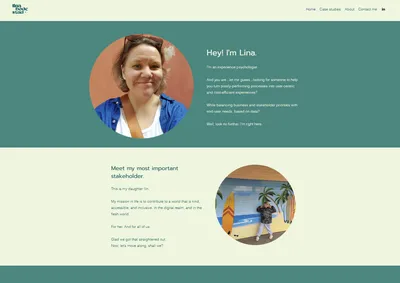
I had a simple portfolio I'd built in Wix years ago. I asked Claude to read it through, look at the existing page structure and review the content, to get some context around what we were going to build.
Step 2 of 8
Ask Claude to improve the texts
In a parallel project, I had asked Claude to review my resumé and compare it to open job ads and consulting ads in my field. I took some of that output as a base for Claude to review my portfolio content from a tech recruiter's perspective.
We iterated through all the updates and saved the new texts as separate .md files.
Step 3 of 8
Have Claude build a design system
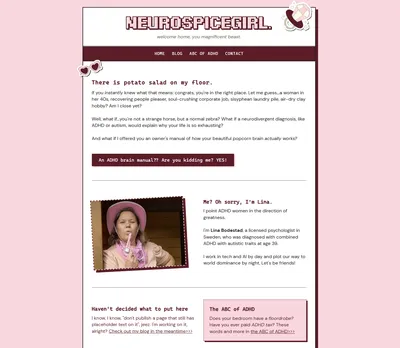
I also had a site I had recently designed and painstakingly coded in HTML and CSS, completely by hand (because that's what nerdy girlies do in their free time). I asked Claude to review that site and turn it into a complete design system, with colors, fonts, text sizes and so on. We then iterated through any additions that were needed, for example separate colors for buttons in a deactivated state.
Step 4 of 8
Ask Claude to build the new portfolio
With the old portfolio site, the updated texts as .md files and the new design system as inputs, I asked Claude to set up a new portfolio site.
I also told Claude from the start that I wanted different design themes that visitors could choose between, but that we would start with one and add the others later. (Yes, I'm a millennial. Yes, I grew up with Winamp. Yes, you know what I'm talking about.)
Step 5 of 8
Create the other themes in Figma
Since I didn't have any existing content for the other themes, I tried a different approach here. I knew I wanted them roughly based on major cities I've been to, that each have their own distinct feel and style.
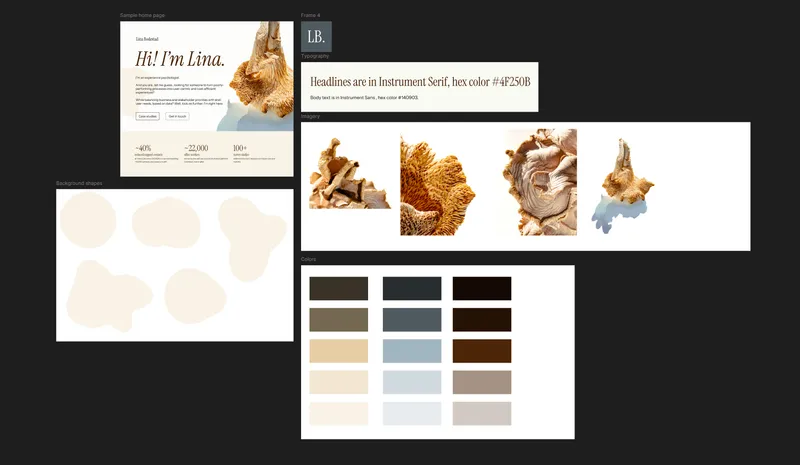
I wanted one theme to be clean, bright and earthy Scandinavian, and initially called it Stockholm. I did a few searches on Unsplash for Scandinavian and Nordic keywords and fell instantly in love with a big chanterelle mushroom with yellow ridges and blue shadows.
Then I based the rest of the theme on that image, using Adobe Color to generate a color scheme from it, and went to Fontshare to find a suitable font (I ended up going with Instrument Serif).
After adding a few quick frames with color variations, font samples and some graphics, I put together a mock hero section to get a feel for how the theme would come together on a page.
Later on I repeated the exact same process for what ended up being the Berliner theme. You'll have to guess which major city inspired that one ;)
Step 6 of 8
Connect Figma to Claude with MCP
In a process that took approximately two whole minutes, I added an MCP connector between Claude and Figma, so Claude could read my rudimentary design systems and build the additional themes from them.
Then it was only a matter of giving Claude a link to a Figma page, telling it to set up a full design system based on that content, and creating an additional theme for the portfolio site.
Step 7 of 8
Iterate, iterate, iterate
Once all three themes were in place, we went through the site in more detail and worked on whitespace, animations, responsive layout and all the other nitty-gritty details, to polish each page, each theme and each screen size.


Step 8 of 8
Press the big Publish button
On a chilly Tuesday afternoon in November, we finally arrived at the big Publish day. I told Claude where my domain and web hosting were, and asked it to set up a GitHub repo so we could publish the site and keep it easy to maintain and update. Claude uploaded the site to my hosting provider and helped me set up the GitHub repo, and with one final ceremonial click on the "Yes, publish" button, my new portfolio was born.